Hydro module
The hydro module mainly governs reservoirs, hydro power plants and the connections between them. The very basics is the unit of a reservoir and a connected hydro power plant with water paths leading to the sea.
Reservoir and hydro power plant unit
The fundamental part of the hydropower production system is the reservoir and hydro power plant combination. The reservoir can store and release water.
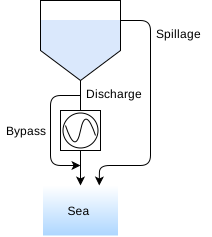
For most logical model object creation functions, check out the Logical model view. Create a reservoir using the creation function for the logical model, and then setting any properties needed for the functionality that is needed.
Important fields are initial and maximum volume and average energy equivalent.
Waterways sets up how the stored water flows to and from the reservoirs. There’s a few types of waterways. For basic use cases discharge, bypass and spillage are needed. Discharge is a waterway with an associated power production, this is the waterway that runs through a power plant. Bypass bypasses the power station, but is transported through the waterway system. Spillage is the pathway the water takes should the volume exceed the physical limit of the reservoir. If this pathway spills into the surrounding area without running down to another reservoir, set the waterway to drain into the sea.
Reservoir balance and result series
The reservoir balance is set up in the model such that the total sum of water in, water out and change of volume in the reservoir equals zero, so that no water is “lost”. This is the same for the whole of the model, the total sum will be zero for all time steps and all areas. For more information on the modelling, see the mathematical model
Energy equivalence
Energy equivalence is a factor for translating water amount to energy amount, usually \(Mm^3\) to GWh. This factor is used in many different places in the simulation, for scaling water values and translating water running through a power plant into energy for the power balance. For most calculations a static average value for the reservoir is used, which needs to be set for each reservoir.
Hydro power plants and pumps will also have an energy equivalence factor, although the hydro power plant factor is calculated from the PQ curves set for the plant, and the pump energy equivalent is negative.
Relative head scaling
Relative head scaling emulates the effect of varying water pressure through a power station. Since water pressure is a function of the height of the water column above the power plant turbine, the model needs information about the relationship between the height of the water and the volume of the reservoirs above and below the power plant. This is done by supplying reservoir curves in the form of XY curves denoting the relationship between reservoir volume and masl (meter above sea level) of the water line. Please see the Hydro module API for the url and units of this input data.
Additionally, the connected hydro plants pressure tunnel should have set its properties for nominal head and tailrace elevation. The nominal head is the reference height difference between the water level above and the outlet (or water level above the tailrace elevation). The tailrace elevation is important if the water level in the reservoir below can increase above the outlet.
The relative head is calculated from the difference between the masl of the water line of the reservoir above and the tailrace (outlet) elevation. Should the water level of the reservoir below rise above the outlet elevation, the largest of these two are used. Then, the elevation is divided by the nominal height. This factor is then multiplied in whenever hydro power output is calculated.
Water inflow
Regulated inflow
Regulated inflow is water caught in a reservoirs water basin, which flows into the reservoir and is stored. Each reservoir has a input data time series with that scenarios inflow into the system, and a property for a factor scaling this time series. This is done so that many reservoirs can share the same timeseries data.
Unregulated inflow
Unregulated inflow is inflow directly to the water supply line between the reservoir and the power plant. This inflow can not be stored and must flow through either the discharge or the bypass waterway. It works the same way as with the regulated inflow, with an input time series for water flow that can be shared and a scaling factor for each power plant.
Due to the water having to flow through the station, if a hydro power plant has unregulated inflow the bypass limit is set high to ensure that the simulation completes. This will overwrite any limits set by the user.
Reservoir minimum and maximum limits
A reservoir with a volume limitation requirement is set up with two stages. The reservoir needs certain properties set in the logical model and a corresponding time series with the limit itself must be supplied to the data set. Refer to the reservoir documentation and the module documentation for information on which properties to set. To make use of this feature, the minimum/maximum types properties must be set.
Both minimum and maximum requirements have two types; soft and hard. These settings behave differently for minimum volume and maximum volume.
Minimum volume
Minimum volume requirements attempt to keep the volume of the reservoir at above a certain minimum.
The hard limit incurs a cost directly when the reservoir dips below the limit. This cost is user configurable.
The soft limit is meant to model that there is no cost to violating the limit, but it is not allowed to let any water out of the reservoir except due to minimum requirements on water flow. In practice, this is modeled by creating a preprocessed hard volume restriction with a limit that is the minimum of the input limit and the achievable minimum volume based on a safe inflow computation.
Maximum volume
This limit can be set as a “tactical” max below the physical limit of the reservoir. Both soft and hard limits introduce an extra variable and cost of going above the limit, although the cost for the hard version is initially higher than the soft version. These two penalties are user configurable.
Target reservoirs
Target reservoirs are reservoirs with a specific target volume that the model will try to follow as close as possible. Moving away from this target incurs a user configurable penalty. To set up a target reservoir the reservoir needs to have the target type property value set to a value that is not NONE, reservoir documentation as well as having a supplied input time series denoting the target.
Please not that certain other features may be disabled should the target type be set. For example, minimum and maximum limits does not make sense for a target reservoir. These reservoirs do not get an end valuation due to the control of the volume being external.
Waterways and hydraulic nodes
The flow of water through the reservoirs all the way down to the sea is modeled by adding waterways and hydraulic nodes. Please check Logical model view API for information on how to create the different waterways.
Each waterway needs a starting point and an end point. When creating a waterway of any type, it’s necessary to supply the id of the upstream and downstream hydraulic node. Hydraulic nodes are a collective term for reservoirs and hydraulic junctions. Additionally, the sea is a special node, an all-purpose drain for water that exits the system. This does not need to be the sea, but can be water draining into the environment.
Hydraulic junctions can be considered reservoirs with no volume, requirements or limits, just a junction point with inflow and outflow.
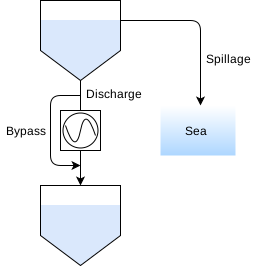
Discharge waterway
The discharge waterway is the pathway for power production using the water from a reservoir. A discharge path is necessary in order to attach a hydro power plant to the reservoir, the id of the path is needed when creating a power plant. Limits for the discharge waterway is controlled by setting up PQ curves for the power plant and setting maximum/minimum limits on the reservoir. Please see the Hydro module API for more information on input data.
Bypass waterway
Bypass models directing the water through the station without producing power. The bypass also has minimum and maximum requirements controlled by input data associated with the reservoir. See Hydro module API for more information. Usage of the bypass waterway incurs a small cost to prioritize not using this pathway. This penalty is user configurable by setting input data for bypass penalty, which can be done on a global level or for individual reservoirs.
Certain situations might force the bounds of the bypass variables to a large value to ensure model feasability. For example when unregulated inflow is in play for the power plant, bypass is set to a large value. (Much larger than the possible inflow.)
Spillage waterway
The spillage waterway models water spilling over the reservoir limits. This water might run down to another reservoir, or be lost to the environment. The spillage path does not need limits set through input data, as this variable is free.
Usage of the spillage waterway incurs a small cost to prioritize not using this pathway. This penalty is user configurable. Default sets the penalty larger than that of the bypass pathway to properly prioritize using bypass if possible.
Tunnels
Reservoirs can have tunnels between them. Tunnels are straight exchanges of water between two reservoirs and enables the model to move water between the connected reservoirs depending on what is the most profitable move.
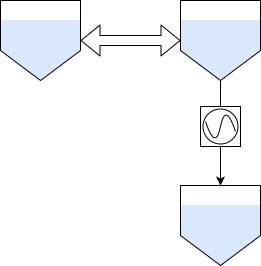
See Hydro module API for information on the input data needed for tunnels. The user should provide two input time series, the maximum limit for each direction of travel. Please note that the max amount of flow in one direction does not need to match the other direction. Additionally, tunnels are not pressure sensitive and can flow “upstream” aginst pressure. For example, flowing from a reservoir at the same height that has less water in it than the reservoir it flows to. This is only governed by the most profitable place for the water to be.
Tunnels and junctions can be combined to model several configurations of reservoir combinations. Please see the chapter for junctions for more information.
Junctions
A special hydraulic node. It behaves as a feature-stripped reservoir with no volume, a blank point for water to flow in and out of without other limits. Any waterway can be connected to the junction, including tunnels.

The total sum of water in and out each time step must be zero. Please take care to ensure limits on the waterways connected to the junction are properly set up to ensure simulation feasability.
Pumping

Pumps can be set up by adding a pump and pump tunnel to the logical model. First, start by creating a pump tunnel between two reservoirs. This type of waterway is special due to having upward flow, i.e. from downstream to upstream.
Next, create a pump that is associated with the pump tunnel. See pump documentation for the properties that need to be filled in. The pump needs metadata on how the pump behaves when the water pressure varies. On the whole, pump power is constant but the capacity of the pump to move water upstreams decreases as the lift height increases. If a constant flow is wanted, set the slope for the flow equation to 0, i.e. flat. Additionally, limits for when to stop pumping needs to be supplied. See Hydro module API These limits are for when the water level above and below the pump is within a range where it is possible to pump.
Please note that a pump may pump water to another reservoir than the one connected via discharge, even to a lower reservoir. Please note that this may interfere with the fall height functionality.
The connected reservoir id is important when creating a pump. If the connected reservoir is the downstream reservoir, this signifies that the pump is a “pure pump” and won’t be checked against the magic water cycle verification done during validation. If the pump is part of a power plant system, set the upstream reservoir as the connected reservoir.

Note that during validation, these values will be checked against the efficiency of the power plant should the pump and the plant be connected to the same up- and downstream reservoirs. This check can result in a warning or blocking error depending on the run configuration. Typically this happens when the pump is more efficient at moving water upstream then the hydro plant is at gaining energy from it. This creates a situation where it is possible to consume less energy pumping the water than the same amount of water can produce. This is a non-physical situation and results in local waterloops.
Pump tunnels
Speciality waterway for use with pumps. While there’s no limits that must be configured through input data, the special feature of this waterway is that it flows from downstream to upstream reservoir.